
Stratégie · 8 min read
Running the BIM transition as an innovation project (Kline and Rosenberg model)
By Mickael Quinart · 9 October 2026
BIM deployment is not linear. Kline and Rosenberg's chain-linked model helps steer it through feedback loops.
Hello, I'm Mickael Quinart, a BIM/CAD consultant at PALLADION. The article you are about to read is an excellent introduction to BIM deployment in design offices, likening it to a non-linear innovation process. I will expand on this content to create a comprehensive educational guide, drawing on my experience and the fundamental principles of BIM adoption.
Innovation Is Not a Straight Line
Innovation is often imagined as a series of linear steps: research, development, production, sales. The Kline and Rosenberg (1986) model, conversely, shows an interconnected chain process, made up of five pathways and numerous feedback loops between the market, design, production, and available knowledge. This model perfectly illustrates the complexity and richness of innovation processes, highlighting the importance of lessons learned and continuous adjustments.
This thesis applies this model to BIM deployment in design offices: each stage feeds information back to the previous ones. It is this iterative nature that is the strength of a successful BIM approach, allowing for constant adaptation to on-the-ground realities and technological developments.
Transposing the Model to BIM
BIM adoption is not limited to acquiring software. It is a profound transformation of working methods, skills, and corporate culture. Transposing the Kline and Rosenberg model to the context of BIM deployment in a design office allows for visualising the necessary interactions between different components and planning a more robust and adaptable innovation strategy.
| Innovation Stage | BIM Transposition in Design Office |
|---|---|
| Potential Market | Client requirements, BIM tenders, competitive intelligence |
| Invention / Analytical Design | Selection of BIM uses (3D modelling, clash detection, quantity take-off, energy simulation), definition of target methodology, drafting internal BIM protocols |
| Detailed Design and Testing | Development of Revit/ARCHICAD templates, creation of family libraries (parametric objects), implementation of pilot projects, interoperability testing (IFC) |
| Redesign and Production | Generalisation across projects, industrialisation of processes, workflow optimisation |
| Distribution and Market | Commercial BIM offering (integration of BIM into value propositions), showcasing references, positioning as an innovative player |
| Knowledge / Research | Technology and regulatory watch (ISO 19650), continuous team training, structured lessons learned (REX), internal R&D |
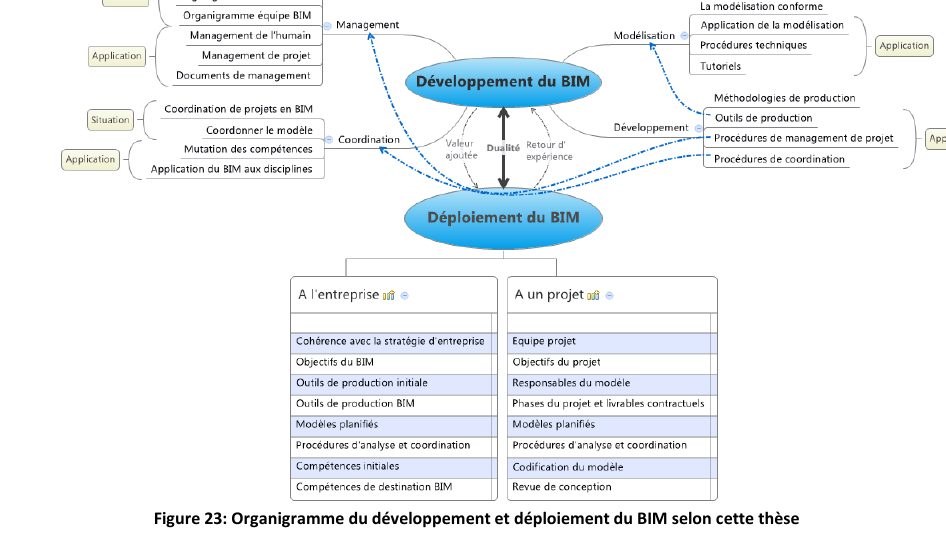
Feedback Loops, the Core of the Method
A pilot project is not merely a demonstration: it is an invaluable source of information. Its difficulties (missing families, faulty IFC exchanges, underestimated time spent) must be fed back into the methodology and templates. Similarly, client feedback guides which BIM uses to prioritise and how to communicate this added value. These feedback loops are key to continuous improvement. They allow for adjusting tools, processes, and skills according to real needs and lessons learned.
In practice, this implies:
- a BIM Lead or BIM Coordinator responsible for collecting feedback from each project, facilitating lessons learned sessions, and acting as the focal point for technical questions;
- periodic method reviews (monthly or quarterly) involving key BIM deployment stakeholders to discuss necessary adjustments to processes and standards;
- a centralised knowledge base (procedures, tutorials, checklists, FAQs) continuously updated and easily accessible to all employees. Tools such as an internal wiki or a collaborative platform can be very useful.
Practical Case in a Design Office
Imagine a structural engineering design office that wants to integrate BIM.
Initially, the management team identifies a growing "potential market" for BIM projects, particularly through tenders requiring a digital model. They then decide to invest in BIM.
The "invention / analytical design" stage begins. They define priority "BIM uses": structural 3D modelling, clash detection with architecture and technical disciplines, and quantity extraction for preliminary take-offs. A "target methodology" is outlined: modelling in Revit, IFC export, clash detection in Navisworks.
Next comes "detailed design and testing." The technical team develops Revit "templates" specific to structural elements (beams, columns, slabs), creates a library of rebar and assembly "families." A "pilot project" is launched on a medium-sized operation to test the method under real conditions.
It is here that the "feedback loops" become crucial. The pilot reveals difficulties:
- The rebar families are not parametric enough and do not adapt to all configurations.
- IFC export to the analysis software is not lossless.
- The estimated time for modelling is significantly underestimated.
- Interfaces with the architect and other disciplines are not smooth.
These feedbacks are not perceived as failures, but as valuable information. The BIM Lead collects these points. During "method reviews," the team decides to:
- Refine existing families and create new, more robust ones.
- Search for more efficient interoperability software solutions for IFC or develop scripts.
- Re-evaluate workloads and adjust schedules.
- Implement regular BIM coordination meetings with partners.
These adjustments constitute "redesign and production": the method is improved, and the tools are optimised. The design office can then consider "generalisation across projects" and begin to promote its "commercial BIM offering" to new clients. Finally, continuous "monitoring" (ISO 19650, latest software versions) and regular "training" ensure the sustainability of the approach.
Step-by-Step Method
To successfully deploy BIM in a design office following this iterative model, here is a structured approach:
1. Initiation and Scoping Phase:
Analyse the market and needs:* Identify client BIM requirements, competitor practices, and business opportunities. Define strategic BIM objectives for the design office (error reduction, improved collaboration, new services).
Define target BIM uses:* Specify which processes will be BIM-enabled as a priority (e.g., architectural modelling, structural, clash detection, quantity take-offs, phasing, environmental analysis). This step must be realistic and aligned with internal competencies.
2. Design and Preparation Phase:
Establish internal methodology and standards:* Draft a simple internal BIM protocol, define levels of development (LOD/LOIN), naming conventions, and exchange processes.
Develop tools and resources:* Create or adapt project templates, develop object libraries (Revit families, ARCHICAD objects) tailored to the design office's specific needs. Set up the software environment (Revit, ARCHICAD, Navisworks, Solibri, etc.).
3. Testing and Experimentation Phase (Pilot Project):
Select a pilot project:* Choose a medium-sized project, with a motivated team and manageable stakes, to test the methodology and tools under real conditions.
Document and monitor:* Record time spent, difficulties encountered, successes, and areas for improvement. Use tools like BCF (BIM Collaboration Format) to track exchanges and issues.
4. Capitalisation and Adjustment Phase:
Organise lessons learned (REX):* Analyse pilot project results, identify gaps in processes, tools, and competencies.
Update standards and tools:* Modify templates, enrich libraries, adjust procedures, refine the BIM protocol.
Strengthen competencies:* Identify needs for additional training for the pilot team and future users.
5. Generalisation and Continuous Optimisation Phase:
Deploy on new projects:* Apply the adjusted method to an increasing number of projects, while continuously monitoring feedback.
Ensure continuous monitoring and training:* Keep abreast of developments in standards (e.g., ISO 19650), software, and market expectations. Plan regular training and knowledge-sharing sessions.
Promote achievements:* Integrate BIM competencies and references into the design office's commercial strategy and communication.
Good Practices / Common Mistakes
| Good Practices | Common Mistakes |
|---|---|
| Adopt an iterative and flexible approach. | Fix the methodology before the first real project. |
| Appoint a dedicated and trained BIM Lead. | Fail to allocate specific human resources for deployment. |
| Systematically capitalise on lessons learned (REX). | Consider a pilot's failure as a failure of BIM. |
| Invest in continuous team training. | Think that purchasing software is sufficient for BIM. |
| Start with manageable pilot projects. | Deploy everywhere simultaneously without capitalising. |
| Define clear and progressive BIM uses. | Aim for too many complex BIM uses from the outset. |
| Involve management and operational staff. | Place the burden of deployment on a single person without support. |
| Prioritise interoperability (IFC, BCF) and open standards. | Become locked into a proprietary software ecosystem without openness. |
| Regularly update resources (templates, families). | Use outdated or unsuitable templates and families. |
| Communicate regularly on progress and benefits. | Fail to promote internal and external successes. |
Points of Vigilance
- Resistance to change: Organisational innovation often involves disrupting habits. It is crucial to support teams, communicate the benefits of BIM, and de-dramatise initial errors. Management support is essential.
- Cost and ROI: BIM deployment represents an investment (software, training, dedicated time). It is important to define key performance indicators (KPIs) to measure return on investment and adjust the strategy if necessary. ROI will not always be immediate but will be measured in the medium/long term through improved quality, reduced errors, and greater competitiveness.
- Technical skills: Proficiency in BIM software (such as Autodesk Revit, Graphisoft ARCHICAD for modelling, or Solibri, Autodesk Navisworks for coordination), as well as exchange formats (IFC) and collaborative platforms (CDE - Common Data Environment), is fundamental. Gaps can hinder the entire process.
- Interoperability: BIM relies on data exchange between different stakeholders and software. Interoperability, often ensured by the IFC (Industry Foundation Classes) format and processes defined by ISO 19650, is a major challenge. Model exchanges can be complex and require particular attention to the quality of exports and imports. The use of the BCF (BIM Collaboration Format) is also very useful for issue management and communication between tools and teams.
- Technology and regulatory watch: The world of BIM is evolving rapidly. It is essential to stay informed about new software versions, emerging tools, and normative standards (particularly the ISO 19650 series, which frames information management on construction projects). Active monitoring allows for continuous adaptation and optimisation of the design office's BIM approach.
Key Takeaways
- BIM is an organisational, non-linear innovation.
- The Kline and Rosenberg model structures deployment into loops.
- Each project feeds into the methodology: capitalising on experience is essential.
This guide, based on a deep understanding of innovation and the specificities of BIM, should help you structure your approach. Agility and continuous learning are the pillars of successful and sustainable BIM deployment.
Article based on the professional thesis "BIM transition and optimised deployment, applied in an engineering firm".
Mickael Quinart, PALLADION
Want to go further?