
Coordination · 9 min read
The BCF format: exchanging coordination issues without emails or screenshots
By Mickael Quinart · 9 October 2026
BIM Collaboration Format: how BCF tracks model issues, owners and resolution across different software.
Hello everyone, Mickael Quinart, BIM/CAD consultant at PALLADION. Today, we're going to delve into a crucial topic for the success of your BIM projects: observation coordination. The efficiency of this coordination is often the weakest link in BIM adoption, quickly transforming a powerful tool into a source of frustration if not managed effectively.
The Problem: Email Coordination
Annotated screenshots, Excel spreadsheets, reports: coordination observations get lost, duplicated, and no one knows which ones have been resolved. There's a missing direct link between the problem and its location in the model.
This "traditional" method of information exchange poses numerous challenges:
- Loss of context: A screenshot without a direct link to the model is often difficult to interpret or locate precisely later on.
- Duplication of tasks: Several stakeholders might identify the same problem independently, leading to redundant efforts.
- Lack of traceability: It's arduous to know who is responsible for what, the status of an observation, and when it needs to be resolved.
- Scattered information: Observations are dispersed across emails, shared folders, instant messages, making an overall view almost impossible.
- Wasted time: Searching for information, consolidating feedback, and manually verifying problem resolution consume valuable time that could be allocated to higher-value tasks.
These pitfalls are unfortunately all too common and can undermine the efficiency and profitability of a project, regardless of the teams' BIM maturity level. The solution lies in adopting standardised processes and tools specifically designed for collaboration.
What is BCF?
The BIM Collaboration Format (BCF), an open standard from buildingSMART, exchanges observations ("topics") independently of the model itself. Each observation contains:
- a title and a description;
- a viewpoint (camera position, involved objects, section);
- a screenshot;
- a status, priority, assignee, and due date;
- the history of comments.
BCF is an open file specification that allows the exchange of "topics" or observations between different BIM software applications, without having to exchange the complete BIM models. It's not about modifying the model, but about communicating information regarding issues, questions, or suggestions related to it. Its role is to facilitate inter-software and inter-discipline dialogue, ensuring that everyone works from the same contextualised information base.
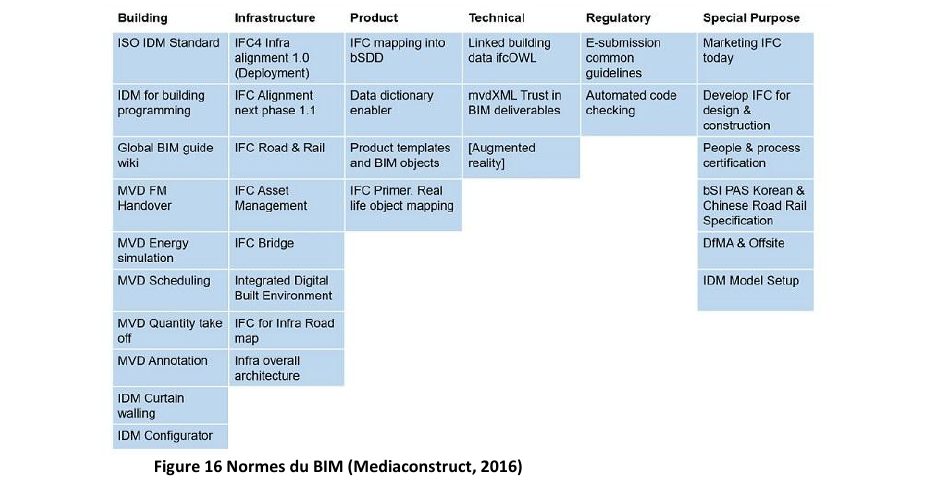
The figure above illustrates BCF's position among BIM standards. It is complementary to IFC (Industry Foundation Classes), which is the exchange format for geometric and alphanumeric data of model objects. While IFC transmits the "what", BCF transmits the "where is the problem" and "what to do about it". This complementarity is essential for fluid and comprehensive BIM collaboration.
File or Server
BCF offers two main modes of use, each adapted to different project contexts:
| Mode | Operation | Usage |
|---|---|---|
| .bcfzip file | Export / import between software | Small teams, occasional exchanges |
| BCF API (server) | Online synchronisation | Multi-stakeholder projects, continuous monitoring |
The .bcfzip file is a compressed container that can hold one or more BCF observations. It is ideal for asynchronous and occasional exchanges. For example, an architect can export a .bcfzip file with observations for the structural engineer, who will import it into their software, address the issues, and then re-export the updated file.
The BCF API (Application Programming Interface), often integrated into collaborative platforms or Common Data Environments (CDEs), allows for real-time or near real-time synchronisation of observations. BIM software (such as Revit, Archicad, Tekla, etc.) or model viewers (such as Navisworks, Solibri, Dalux, Bexel, etc.) can connect directly to a BCF server. This means that when an observation is created, modified, or resolved by one stakeholder, the information is immediately available to others, ensuring an always up-to-date view of the coordination status. This is the preferred mode for complex projects involving many stakeholders and requiring rigorous monitoring.
Practical Case Study in a Design Office
Imagine a technical design office (MEP consultancy) working on an office building project. The teams have received the IFC models from the architects and the structural engineers. They are using MEP modelling software (such as Revit) and a clash detection tool (such as Navisworks or Solibri).
During the first combined model review, the HVAC engineer identifies a ventilation duct inappropriately passing through a structural wall, and another interfering with a cable tray. Instead of sending an email with screenshots, they use their clash detection software's BCF integration.
1. Creation of observations: In the clash detection tool, after identifying the interferences, they select a clash and create a new BCF observation. The software automatically captures the viewpoint, the conflicting objects, and an image. They add an explicit title ("HVAC duct penetrates structural wall - Ground Floor"), a detailed description, assign "High" priority, designate the architect as responsible (for the wall) and the electrician (for the cable tray), and set a due date. They do the same for the second clash.
2. Sharing: If the project uses a collaborative platform with BCF API (e.g. ACC, Trimble Connect, Dalux, Bexel... there are many market solutions), these observations are instantly synchronised. If not, they export a .bcfzip file which they upload to the project's CDE.
3. Processing by other disciplines:
* The architect downloads the .bcfzip file (or sees the notification on the platform) and imports it into their design software (e.g. Revit). By selecting the BCF observation, their software positions them directly at the exact viewpoint of the problem. They can then quickly understand the context, adjust their model (e.g. create an opening in the wall), and mark the observation as "Proposed for Resolution" or add a comment.
* The electrician does the same for the clash with the cable tray; they can adjust the path of their cable containment and mark the observation as resolved.
4. Verification and closure: During the next model review, the HVAC engineer updates the models from the other disciplines. They re-run their clash detections and verify that the problems initially reported have indeed been resolved. If so, they mark the corresponding BCF observations as "Resolved" or "Closed" in their tool.
This process ensures targeted, traceable, and efficient communication, drastically reducing back-and-forth exchanges and the risks of oversight or misinterpretation.
Step-by-Step Method
Successful integration of BCF into your BIM workflow is not achieved without a rigorous method. Here are the key steps:
- Define the BCF strategy in the BIM Execution Plan: Even before modelling begins, the BIM Execution Plan must specify the chosen BCF tool (platform or file), supported BCF versions, the taxonomy of statuses and priorities, roles and responsibilities for creating and resolving observations, as well as verification cycles. This ensures a common understanding and avoids misinterpretations. This is an essential prerequisite of the ISO 19650 standard.
- Create targeted and complete observations: For each identified problem (clash, technical query, proposed modification), create a unique BCF observation. Ensure it includes a clear title, a detailed description, the exact viewpoint, a screenshot, the objects concerned (if possible), the assignee responsible for resolution, a realistic due date, and a defined priority. A well-documented observation is halfway to being resolved.
- Share and track observations: Depending on the chosen mode (file or server), export the .bcfzip or synchronise with the collaborative platform. The relevant stakeholders then receive the observations. It is crucial to organise regular reviews (weekly or bi-weekly) to go through open observations, discuss blockers, and ensure progress. This is an opportunity to add comments and modify statuses.
- Verify resolution in the model: Once a stakeholder has marked an observation as "Resolved" or "Proposed for Resolution", the person who raised the observation or the BIM coordinator must verify in the updated model (via a new IFC file, for example) that the modification has been carried out and that it has not created new problems. This step is critical and must not be overlooked.
- Close the observation: After verification and confirmation that the problem is resolved, the observation can be closed. A complete history of exchanges and resolutions is thus preserved, traceable for any future checks or for project archiving.
Integrating BCF into the Method
- Declare it in the BIM Execution Plan (version, tool, workflow).
- Open one observation per problem, not per raw clash.
- Systematically assign an assignee and a due date.
- Review open observations at each model review.
- Close after verification in the new model.
Best Practices / Common Errors
| Best Practices | Common Errors |
|---|---|
| One observation = one clear and unique problem. | Creating generic observations or grouping several distinct problems. |
| Explicit title and detailed description. | Vague title ("Clash") or minimal description. |
| Systematically assign an assignee and a due date. | Leaving an observation without an assignee or deadline. |
| Use a CDE with BCF API for complex projects. | Multiplying .bcfzip files on a large project, a source of confusion. |
| Integrate BCF into every coordination phase. | Using BCF only for clash detection, and not for other issues. |
| Verify resolution directly in the updated model. | Relying solely on "Resolved" status without visual verification. |
| Train teams on the BCF tool and process. | Assuming teams will know how to use it without training or guidance. |
| Define clear rules (statuses, priorities) in the BIM Execution Plan. | Absence of rules, everyone uses statuses as they please. |
| Archive closed observations for traceability. | Deleting observations once resolved, losing history. |
Points to Watch Out For
- Interpretation of statuses: Ensure all stakeholders understand the exact meaning of each BCF status ("Open", "In Progress", "Resolved", "Closed", "Rejected", etc.). A clear taxonomy in the BIM Execution Plan is essential.
- Model versions: It is crucial that each BCF observation is linked to a specific version of the model (IFC or native). Without this precision, verifying resolution can become complex if multiple versions are in circulation. The CDE plays a major role here in version management.
- Workload: Too many observations can become unmanageable. It is sometimes better to group minor clashes or prioritise the most critical ones to avoid overwhelming teams. Artificial intelligence is beginning to offer interesting avenues for grouping clashes and facilitating their management.
- Model quality: BCF is a communication tool, not a substitute for the quality of initial models. Poorly modelled models will generate an unmanageable volume of observations. A good practice is to rely on upfront IFC model quality control tools (validation of schemas, properties, etc.).
- Training and adoption: The effectiveness of BCF depends directly on its adoption by all project team members. Training sessions and regular reminders of best practices are essential to guarantee its success.
Key Takeaways
- BCF links each observation to a model viewpoint.
- Status, assignee, and due date make coordination traceable.
- It works across different software: it is the common language of coordination.
By adopting BCF in a structured manner, you will transform your coordination process, moving from reactive and fragmented management to a proactive, transparent, and efficient approach. This is a fundamental step towards true BIM collaboration.
Article based on the professional thesis "BIM transition and optimised deployment, applied in an engineering firm".
Mickael Quinart, PALLADION
Want to go further?