
Données · 8 min read
bSDD and classifications: giving meaning to model properties
By Mickael Quinart · 9 October 2026
The buildingSMART Data Dictionary (bSDD) harmonises properties and classifications. Why it is the key to truly usable BIM data.
A model without a dictionary is a Tower of Babel
Every software application, every company names its properties in its own way: "Résistance au feu", "REI", "Fire_Rating"… For data to be usable by another stakeholder, it must be unambiguously defined. This issue of semantic and data interoperability is one of the fundamental pillars of effective and collaborative BIM. Without a common language to describe objects and their characteristics, the digital model risks becoming a source of confusion rather than a communication tool.
The challenge of semantic interoperability
In a construction project, numerous stakeholders (architects, structural engineers, M&E engineers, quantity surveyors, contractors, maintainers) intervene with their own tools and methods. Each generates essential information, but often encapsulated in proprietary formats or named disparately. This is where the concept of a "data dictionary" comes in: a shared repository that allows local terms to be mapped to standardised and universally understood definitions. The goal is to ensure that when one stakeholder refers to "fire resistance", another understands precisely which property is being discussed, with what unit and expected range of values, regardless of the terminology initially used.
bSDD: buildingSMART's data dictionary
The buildingSMART Data Dictionary (bSDD) is an online service that references concepts, properties, and classifications with a unique identifier, definitions, and translations. It links national classifications and IFC entities.
The bSDD is much more than a simple list of terms. It is designed as a multilingual and interoperable database, allowing for the definition of product classes, properties associated with these products, units of measurement, and even predefined value lists. Each concept in the bSDD is assigned a unique and persistent identifier (UUID), ensuring that, regardless of language or context, the concept remains the same. This standardisation is crucial for automating data exchange, compliance verification, and information utilisation throughout the building's lifecycle.

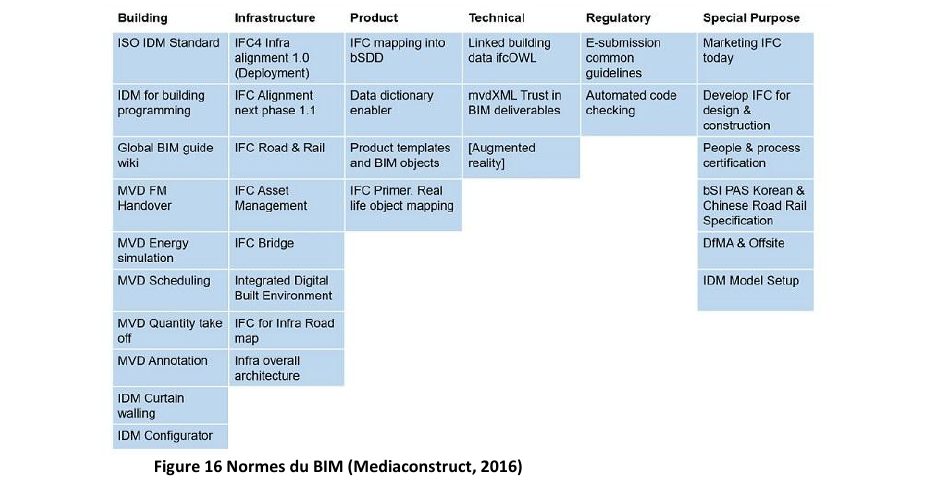
The figure above illustrates the complexity of standards and classifications within the BIM ecosystem. The bSDD positions itself as a central pivot, capable of creating bridges between these different approaches, thereby facilitating the consistency of data exchanged via the IFC format.
Classifications to be aware of
| Classification | Usage |
|---|---|
| Uniclass (UK) | Elements, systems, products, spaces |
| OmniClass (US) | Multi-table classification |
| National / Company Classifications | Lots, deliverables, internal codes |
The key is not to use the "best" classification, but to choose one, document it in the protocol, and apply it consistently. These classification systems are structured taxonomies that organise information about construction objects. They enable categorisation of model elements to facilitate search, sorting, cost analysis, project management, and maintenance. Whether it's a widely recognised international classification like Uniclass or OmniClass, or an internal system specific to a company or project, consistency and documentation are paramount. The project's BIM protocol must imperatively specify the chosen classification(s) and the rules for their application.
Best practices for design offices
- Prioritise the use of standard IFC properties (Pset_WallCommon, etc.). These Property Sets (Psets) are defined by buildingSMART International and are integrated into the IFC format. They represent the common basis for describing construction objects and should be favoured to maximise interoperability.
- Limit custom properties and document them. If specific properties are necessary, they must be clearly defined, logically named, and their use explained in the BIM protocol. Ideally, they should be registered in a shared data dictionary, potentially via the bSDD.
- Associate each object with a declared classification. Every element of the model must be categorised according to the chosen classification system, from its creation.
- Check for the absence of unclassified or unnamed objects before dissemination. "Ghost" or poorly identified objects are a major source of errors and information loss. Regular checks are essential.
Practical case study in a design office
Imagine a structural engineering design office (Structural DE) working on a BIM office building project. The team models slabs, columns, beams, walls, and foundations.
When modelling slabs, the designer must input properties such as "Design span", "Slab thickness", and "Exposure class".
- Without a data dictionary or strict protocol: The designer might name the "Slab thickness" property in various ways according to their habit or software: "Epaisseur_dalle", "Slab_Thickness", "THK_DALLE". For "Exposure class", they might type "XC1", "Internal exposure", "Normal_amb", etc. Without a common reference, the M&E engineer, quantity surveyor, or general contractor who receives the model will not always know which property corresponds to what, or will have to make manual interpretations, leading to errors and wasted time.
2. With a data dictionary (bSDD) and a BIM protocol: The project's BIM protocol stipulates the use of IFC as the exchange format and the bSDD (or a company dictionary based on the bSDD) for properties.
* For thickness, the protocol indicates populating the standard IFC property `Pset_SlabCommon.Thickness`.
* For "Exposure class", the bSDD has been consulted, and a standardised concept with a unique identifier (UUID) is referenced, for example `p_ConcreteExposureClass`. The protocol specifies that this property must be added as a custom property if it is not a standard IFC property, and its values must be drawn from a predefined list (e.g., "XC1", "XC2", "XD1", etc.) registered in the bSDD.
* Furthermore, the Uniclass classification is adopted for objects. The designer assigns the classification `Ss_20_20_75_05` (Concrete floor slabs) to all slabs.
Thanks to this structured approach, the quantity surveyor can automatically extract all slab thicknesses (`Pset_SlabCommon.Thickness`) for their bill of quantities, and the contractor can filter slabs by "Exposure class" (`p_ConcreteExposureClass`) to adapt their concrete pouring and curing methods, without any ambiguity regarding the data. Errors are minimised, and collaboration is streamlined.
Best practices / Common errors
| Best Practices | Common Errors |
|---|---|
| Use standard IFC Psets. | Systematically creating custom properties, even if a Pset exists. |
| Document every custom property. | Leaving custom properties without clear definitions. |
| Adopt a single classification and follow it. | Using multiple classification systems inconsistently, or none at all. |
| Name objects in a structured way (e.g., naming convention). | Objects without names, generic names (e.g., "Wall 1", "Column A"). |
| Check data quality (names, classifications) before sharing. | Sharing unchecked models with missing/erroneous data. |
| Use data dictionary tools (e.g., bSDD). | Relying solely on collective memory or uncentralised documents. |
| Train teams in semantics and standards. | Neglecting training, assuming usage is intuitive. |
| Integrate data requirements into the BIM protocol. | Not clearly specifying expectations for properties and classification. |
Step-by-step method
- Define the project's information strategy: Upfront, during the development of the BIM protocol, identify the information needs of each stakeholder. What types of data are required? For what uses (quantities, simulations, maintenance)?
- Choose standard references: Select the classification system (e.g., Uniclass) and property sets (standard IFC Psets) to prioritise. For specific properties, consider using the bSDD to find or register standardised concepts.
- Establish a naming and property convention: Precisely document the naming rules for objects, layers/levels, and the list of expected properties for each object type, with their definitions, units, and, if possible, accepted value lists. For non-standard IFC properties, create detailed descriptive sheets.
- Integrate requirements into software templates: Configure modelling software templates (Revit, Archicad, Allplan, etc.) with pre-set project parameters, shared properties, and classifications to guide modellers.
- Train and regularly audit: Raise awareness and train teams on the importance of correct data entry. Implement quality control procedures (e.g., checking names, classifications, and property values using tools like Navisworks, Solibri, or CDE platforms integrating IFC checking modules).
- Capitalise and evolve: Learn lessons from each project to refine conventions, enrich the internal data dictionary, and improve templates. Participate in feedback sessions to contribute to the improvement of standards (bSDD, IFC).
Points of vigilance
- Information overload: Avoid inputting too many unnecessary properties. Every piece of data must have a clear purpose. Overload harms performance and readability.
- Versioning and updates: Data dictionaries and BIM protocols must be versioned, and their updates communicated effectively to all stakeholders.
- Tool interoperability: Ensure that the software tools used by different stakeholders are capable of reading and writing the defined properties and classifications, particularly via the IFC format. Test data exchanges at the start of the project.
- Dictionary maintenance: A data dictionary is not static. It requires continuous management and maintenance to remain relevant in the face of evolving standards, materials, and technologies.
- Resistance to change: Habits are tenacious. It is crucial to support change with communication, training, and demonstration of concrete benefits.
Key takeaways
- A property is only valuable if it is defined and shared.
- The bSDD links concepts, classifications, and IFC, acting as a central semantic repository.
- Choosing a classification, documenting it, and controlling it are fundamental actions for BIM data quality.
The site's free BIM analysis specifically checks classifications, properties, and unnamed objects in your IFC. This is an essential first step to ensure the usability of your digital models and transform the Tower of Babel into a structure of harmonious collaboration.
Article based on the professional thesis "BIM transition and optimised deployment, applied in an engineering firm".
Mickael Quinart, PALLADION
Want to go further?